- Why It Scatters in the First Place
- The Problem With Relying on One App's Native Saves
- Start With What You Already Have
- Pick Categories That Match How You Actually Think
- Use Your Phone's Share Sheet as the Bridge
- Dealing With Screenshots Specifically
- Making Inspiration Actually Searchable
- Revisiting and Narrowing Over Time
- Sharing Organized Inspiration With Vendors
- Involving a Partner or Bridal Party Without Losing Organization
- It Doesn't Need to Be Perfect
- Setting Up a Habit, Not Just a One-Time Cleanup
- What to Do With Inspiration You Never Use
- FAQ
Most engaged couples aren't short on wedding inspiration, they're drowning in it, scattered across a Pinterest board, a folder of Instagram saves, a handful of TikToks bookmarked but never revisited, and a camera roll full of screenshots with no context. Here's how to actually bring it together.
Why It Scatters in the First Place
Inspiration doesn't show up on a schedule, it shows up while you're scrolling, wherever you happen to be scrolling. A dress on Instagram, a reception idea on TikTok, a florist's portfolio on Pinterest. Each platform is designed to keep that content inside itself, so unless you're deliberately pulling things out and consolidating, everything you've saved stays locked in separate apps that don't talk to each other.
The Problem With Relying on One App's Native Saves
Pinterest boards work fine for Pinterest content, but they can't hold an Instagram Reel or a TikTok. Instagram's saved posts are searchable within Instagram, but invisible everywhere else. Whatever platform you lean on hardest becomes your default inspiration home, while everything from other apps quietly falls through the cracks, or ends up as disconnected camera roll screenshots with zero context by the time you look at them again.
Start With What You Already Have
Before building a new system, do a quick sweep of what's already scattered: your Pinterest boards, Instagram saved collections, camera roll screenshots, and any notes app entries. You don't need to move everything at once, but knowing the scope of what's already saved makes it easier to decide what actually needs consolidating versus what you've already moved past.

Pick Categories That Match How You Actually Think
Generic categories like "ideas" or "inspo" don't hold up once you have more than a handful of saves. Categories that map to actual wedding planning decisions, Venue, Florals, Decor, Dress, Photography, Bachelorette, make it much easier to find something later when you're actually trying to make a decision, rather than scrolling through one giant undifferentiated pile.
Use Your Phone's Share Sheet as the Bridge
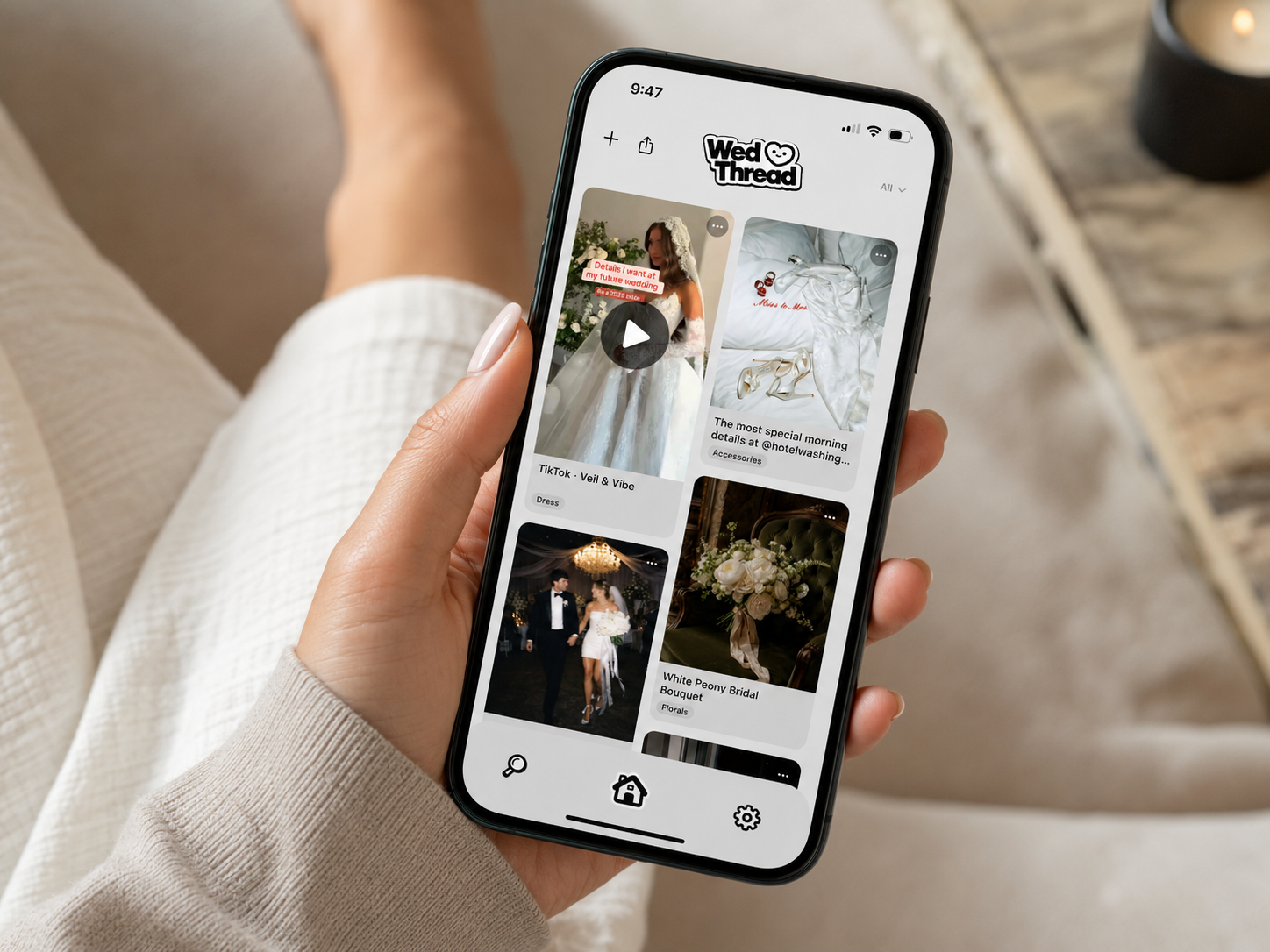
The share sheet, the menu that pops up when you tap "share" on a post in any app, is the actual bridge between scattered platforms and one organized place. WedThread is built around this specifically: whatever you're looking at, a Pinterest pin, an Instagram Reel, a TikTok, tap share, send it to WedThread, and it lands in one feed sorted automatically into the right category, no manual filing required.
Dealing With Screenshots Specifically
Screenshots are the hardest inspiration to organize because they carry no source link and often no context by the time you revisit them. Going forward, sharing directly from the source app instead of screenshotting preserves the link back to the original post, which matters later if you want to message a vendor or revisit the exact source.
Making Inspiration Actually Searchable
A pile of saved images is only useful if you can find what you're looking for later. Adding a short note when you save something, even just "this color palette" or "this dress silhouette," makes a huge difference months later when you're trying to remember why you saved a specific image in the first place.
Revisiting and Narrowing Over Time
Early in planning, saving broadly is useful, it helps you figure out what you actually like. Later, revisiting saved inspiration and narrowing it down to genuine favorites, rather than keeping everything indefinitely, makes the eventual decisions, choosing a florist, a dress, a color palette, much more manageable than starting from an unfiltered pile of hundreds of saves.
Sharing Organized Inspiration With Vendors
Once inspiration is actually organized by category, sharing it becomes far easier too. Sending a florist a clean, sorted collection of centerpiece and bouquet inspiration gets a much more useful response than sending a mixed folder of screenshots covering six unrelated categories. WedThread lets you share an entire category as a link, so a vendor sees exactly the relevant inspiration without wading through everything else you've saved.
Involving a Partner or Bridal Party Without Losing Organization
If you're not planning solo, keeping shared inspiration organized gets harder the more people are contributing ideas. Agreeing early on where inspiration lives, rather than letting a partner's saves live in one app and yours in another, avoids the situation where good ideas exist somewhere but nobody remembers which app they're buried in.
It Doesn't Need to Be Perfect
Organizing inspiration isn't about achieving a flawless system, it's about making sure the ideas you actually care about are findable when you need them. A slightly imperfect but consolidated system beats a technically perfect one that's too much effort to maintain.
Setting Up a Habit, Not Just a One-Time Cleanup
A single consolidation effort feels productive in the moment, but inspiration keeps arriving throughout planning, so the real win is building a habit of saving in one place going forward rather than treating organization as a one-time project. Even five minutes a week spent moving anything scattered back into your main system prevents the same fragmentation from creeping back in by the time you're deep into vendor decisions.
What to Do With Inspiration You Never Use
Not every saved idea makes it into the final wedding, and that's completely normal. Rather than feeling obligated to justify every save, it's fine to let some inspiration simply exist as part of the process of figuring out your taste, without needing to act on every single thing you once found appealing.
Because inspiration shows up wherever you happen to be scrolling, a Pinterest search one day, an Instagram Reel the next, a TikTok a friend sends you. Each app is built to keep you inside it, not to hand that content off somewhere central.
It works for anything already on Pinterest, but it can't hold an Instagram Reel, a TikTok, or a screenshot, so anything from those platforms still needs somewhere else to live.
Enough to be useful, not so many it becomes its own project. Broad categories like Venue, Decor, Dress, and Florals cover most of what people save without requiring constant micro-decisions about where something belongs.
Not necessarily right away. Ideas you've moved past can still be useful as a record of your taste evolving, and it's easier to skip past old saves than to second-guess a delete decision mid-planning.
Pick one small category, like just centerpieces or just dresses, and consolidate everything you can find for that one category first. Trying to organize everything at once tends to stall out before it's finished.
It uses your phone's share sheet, so anything you find in Pinterest, Instagram, TikTok, or any other app can be saved directly into WedThread in a couple taps, then it's automatically sorted into categories without you doing the manual work.